Classroom Clickers vs Kahoot vs Quizizz

Ask a teacher what they use for quick checks and you will usually hear a platform name, not a hardware name. Then ask what happens when the access point is saturated, or when the building goes phone-free, or when a 1:1 cart comes back with nine dead Chromebooks. That is the seam this comparison lives in. Game-based quiz platforms are excellent at what they do and helpless without devices and bandwidth. A clicker kit is the opposite.

Should a classroom use clickers, Kahoot, or Quizizz for quick checks and review?

The one-line answer: use the QOMO QClick QRF300 (from $687.88 for a 12-remote kit to $1,588.88 for 32) when the activity must run regardless of devices, network, or phone policy, since it is a one-time purchase at roughly $50 to $57 per seat with no accounts and no subscription. Use Kahoot when the room already has a device per student and you want its game show format, with school and district plans commonly listed around $15 per teacher per month for standard tiers and $25 for pro tiers on annual billing. Use Quizizz, now branded Wayground, when self-paced homework-style practice matters more than a live shared screen, with an individual teacher plan reported around $144 per year and school pricing quoted per campus. Many buildings end up with both: a subscription for connected classrooms, and a clicker kit for the rooms and the days where connectivity is not a given.

3 Tools Compared

Tool / Business / Provider Score Speed / Distance Pricing / Details Rating
Top Choice
94%
Works offline From $687.88 (12-seat kit) ★★★★★
89%
Instant setup Free tier; school plans commonly listed near $15-$25 per teacher/month ★★★★☆
87%
Self-paced friendly Free tier; individual plan reported near $144/year ★★★★☆

QOMO QClick QRF300

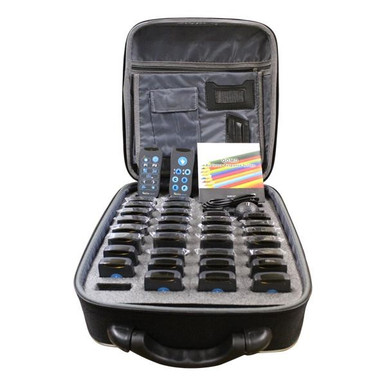
The QRF300 wins this comparison on availability rather than features. It is a class pack of RF remotes with its own receiver, so the activity does not care whether the Wi-Fi is congested, whether students have phones, or whether the cart charged overnight. In a building with a phone-free policy or an aging wireless network, it is frequently the only one of these three options that can actually run third period.

  • Class packs QRF312 (12), QRF324 (24), and QRF332 (32) at $687.88 to $1,588.88, against MSRPs of $994.00 to $2,281.00, a saving of up to $306.12.
  • Roughly $50 to $57 per seat, paid once, with no per-teacher or per-student subscription behind it.
  • Individual and group participation formats support both solo checks and team review games.
  • XML import and export plus conversion of results into PowerPoint slides for reporting.
  • Anonymous responding, so students answer honestly instead of following the room.

What it will not do is compete on production value. There is no leaderboard music, no avatar, no memes. If engagement theater is the point of the activity, a platform wins. If getting an honest read on 28 students in ninety seconds is the point, the clickers do it every single time.

Read More : https://www.encoredataproducts.com/audience-response-systems/qomo-qclick-qrf300-audience-response-system/
Pros
  • Runs with no Wi-Fi, no student phones, and no accounts, so it works in phone-free and low-bandwidth buildings. High
  • One-time purchase; five years of use costs the same as one year of use. High
  • No student data collection or account creation, which simplifies privacy review for younger grades. Medium
  • Identical experience for every student, with no advantage for whoever has the faster phone. High
  • Published price, district PO, and TIPS 230901 and Choice Partners contracts through Encore Data Products. High
Cons
  • No leaderboards, avatars, or game-show production values that drive engagement in some classrooms. High
  • Someone has to distribute, collect, and inventory 12 to 32 physical remotes each period. High
  • No homework or self-paced mode; the remotes only work in the room with the receiver. High
  • Question authoring is PowerPoint-centered rather than a shared online library. Medium

Kahoot!

Kahoot is the reason a generation of students associates review day with a countdown timer and a podium graphic. Nothing in this comparison matches its live energy, and the free education tier means a teacher can try it this afternoon without a purchase order. For a connected classroom with a device in every hand, it is a genuinely strong tool and the default for a reason.

  • Free education tier for individual teachers, with paid Plus and Premium teacher tiers layered above it.
  • School and district plans are commonly listed around $15 per teacher per month for standard tiers and $25 for pro tiers on annual billing, with reported session capacities in the hundreds to low thousands of participants.
  • District-wide pricing is quoted per organization rather than published as a flat rate.
  • Live game format with leaderboards and timers that reliably lifts participation in review sessions.
  • Runs in a browser on any student device, with no receiver, no batteries, and nothing to hand out.

The tradeoff is structural. Every participant needs a working device on a working network, the cost repeats annually, and published tier pricing shifts between plans, so a district should confirm current numbers with the vendor before budgeting a multi-year line.

Read More : https://kahoot.com/schools/
Pros
  • Highest engagement format in this comparison, with live leaderboards and timers built for review sessions. High
  • Free education tier lets a teacher start today with no procurement step. High
  • No hardware to buy, store, charge, or collect at the end of the period. High
Cons
  • Requires a working device and network connection for every participant, which is exactly what fails on bad days. High
  • Recurring per-teacher cost with nothing owned at the end of the subscription. High
  • Published plan pricing varies by source and tier and should be confirmed with the vendor before budgeting. Medium
  • Student accounts and personal devices add privacy and supervision considerations clickers avoid. Medium

Quizizz (Wayground)

Quizizz, rebranded Wayground, took the game-based quiz idea in a different direction: each student moves at their own pace on their own screen instead of the whole class watching a shared projector. That makes it the better platform for homework, station work, and practice sets, and it keeps a free starter tier for individual teachers.

  • Free starter tier for individual teachers, with a paid individual plan reported at roughly $144 per year, about $12 per month.
  • Team and school tiers are quoted per campus or district, with a reported team plan near $50 per month covering a small group of teachers.
  • Event-style pricing exists for large one-off sessions supporting up to about 1,000 participants.
  • Self-paced mode works for asynchronous homework in a way no clicker system can match.
  • Question banks are shareable and reusable across teachers, unlike locally authored clicker decks.

Its weakness in this comparison is identical to Kahoot's and unavoidable for any browser-based tool: no device, no activity. It also moves the work out of the shared room, which is a feature for practice and a drawback when the goal is a fast, visible whole-class check.

Read More : https://wayground.com/
Pros
  • Self-paced mode supports homework and station work, which clicker hardware cannot do at all. High
  • Free starter tier plus shareable question banks across teachers. High
  • No hardware inventory, batteries, or receiver to manage. High
Cons
  • Every student needs a connected device, so it fails in the same conditions Kahoot does. High
  • Individual plan reported near $144 per year, recurring, with school and district tiers requiring a quote. Medium
  • Recent rebrand to Wayground means older documentation, purchase orders, and training materials use a different product name. Medium
  • Self-paced emphasis makes it weaker than a clicker or Kahoot for an instant whole-class read. Medium
Kahoot!

Kahoot!

Best engagement, entirely dependent on devices and bandwidth

Required
Device Per Student
Annual
Billing
Free tier
Entry Point

Kahoot!

Best engagement, entirely dependent on devices and bandwidth

Quizizz, now Wayground, comes third here only because this article is about instant in-room checks. On its own ground, self-paced practice and asynchronous homework, it beats both other options outright, and no clicker kit will ever assign practice that students complete at home. It loses this specific comparison for the same reason Kahoot does: the moment the network or the devices fail, the lesson plan fails with them. That is not a knock on the software, it is a description of what a browser-based tool is. Keep it for practice; keep a clicker kit for the days the devices do not cooperate.

QOMO QClick QRF300

QOMO QClick QRF300: The only one here that works with no devices and no network

None
Student Devices Needed
$0
Annual Fees
~$50
Per Seat (32-pack)
Shop the QOMO QClick QRF300

Clickers or Platforms: Buy for the Bad Day

Plan around the worst day, not the best one. If your classrooms reliably have a charged device per student on solid Wi-Fi, Kahoot and Quizizz are excellent and cost nothing to try. If your building has a phone-free policy, a saturated access point, shared carts, or grades where personal devices are not appropriate, buy the QOMO QClick QRF300: $687.88 for a 12-remote kit up to $1,588.88 for 32, roughly $50 to $57 per seat, once, with the receiver and teacher remote included.

Plenty of districts run both, and that is a defensible answer rather than a hedge. The subscription covers connected rooms and homework practice; the clicker kit covers testing rooms, assemblies, and every day the network has other plans. Encore Data Products lists the QOMO QClick QRF300 and QRF500 with published pricing, accepts school and district purchase orders, and sells through TIPS 230901 and Choice Partners. Call 866-926-1669 to size a kit.

Frequently Asked Questions

For instant whole-class checks in rooms where devices or Wi-Fi cannot be guaranteed, yes. The QOMO QClick QRF300 uses its own RF remotes and receiver, so it needs no student devices, no network, and no accounts. For engagement-heavy review games or self-paced homework in fully connected classrooms, the platforms are stronger.
A QRF332 kit is $1,588.88 once, roughly $50 per seat, and continues working with no further payment. Platform pricing recurs: Kahoot school and district tiers are commonly listed near $15 to $25 per teacher per month on annual billing, and Quizizz reports an individual plan near $144 per year with school pricing quoted per campus. Multiply by teachers and years to compare.
Yes. The QClick systems communicate over their own RF link between the remotes and the receiver, independent of the school network. The QRF500 additionally runs polls without a computer attached, which removes another point of failure.
Clicker remotes do not require student accounts, logins, or personal devices, which keeps quick checks outside account-based platforms entirely. Browser-based quiz platforms involve student-facing accounts or joined sessions and should go through your district's normal privacy review.
Yes, and many buildings do. Use the platform in connected classrooms and for self-paced practice, and keep a QOMO QClick class set for testing rooms, assemblies, phone-free periods, and any day the wireless network is unreliable. The kit is a one-time purchase, so it costs nothing to keep in reserve.

Useful Resources