Chromebook-Compatible Headsets for Schools

Chromebook is a category, not a single device, and the ports vary from model to model. Some have a 3.5mm combo jack, some a USB-A port, and the newer ones a USB-C port. The headset that is perfect for one cart can be useless on the next. The trick is not brand loyalty, it is matching the plug to your fleet. Here is how to do it.

What headsets are compatible with school Chromebooks?

Chromebook compatibility comes down to the plug on your devices: a 3.5mm TRRS combo jack, a USB-A port, or a USB-C port. Match the headset to that port. For the growing base of USB-C Chromebooks, the AVID AE-55USBC ($18.59) is the plug-and-play pick with a mic and no adapter. For USB-A Chromebooks, the padded Logitech H390 ($27.99) is a durable, driver-free choice, and the HamiltonBuhl MACH-1 ($11.99) is the budget USB-A option. All three are wired, which is what ChromeOS testing and everyday use want. Check your fleet's port first, then buy to match.

3 Tools Compared

Tool / Business / Provider Score Speed / Distance Pricing / Details Rating
Top Choice
96%
Plug-and-play USB-C $18.59 ★★★★★
91%
Plug-and-play USB-A $27.99 ★★★★★
87%
Plug-and-play USB-A $11.99 ★★★★☆

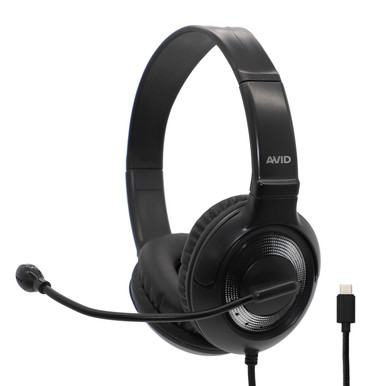
AVID AE-55USBC

The AVID AE-55USBC is a classroom headset that terminates in a native USB-C plug, which is exactly what the newest Chromebooks and Chromebook tablets are moving toward. Because it is a digital USB device, it plugs straight in with no drivers and no adapter, and it carries a microphone for speaking domains and video calls. At $18.59 it is the forward-looking pick for a fleet that is standardizing on USB-C. Distributed by Encore Data Products.

  • Native USB-C connector for modern Chromebooks and tablets, no dongle.
  • Driver-free digital USB audio, recognized on plug-in.
  • Integrated microphone for speaking tests and classroom conferencing.
  • Wired connection meets ChromeOS testing's no-Bluetooth requirement.
  • Sidesteps 3.5mm jack failures common on aging devices.

For a district buying into USB-C Chromebooks, the AE-55USBC is the headset that matches the port without adapters and keeps a digital audio path. It is our default pick when the fleet is USB-C.

Read More : https://www.encoredataproducts.com/school-headphones-with-microphones/avid-ae-55-headphones-headset-with-usbc-plug-black-and-silver/
Pros
  • Native USB-C matches modern Chromebook fleets with no adapter. High
  • Driver-free digital audio, ready on plug-in. High
  • Integrated mic covers speaking domains and video calls. High
  • Avoids reliance on a 3.5mm jack that may be worn or damaged. Medium
Cons
  • USB-C only; USB-A or jack-only Chromebooks need a different plug. High
  • Costs more than the budget USB-A MACH-1. Medium

Logitech H390

The Logitech H390 is a padded USB-A headset that fits the large installed base of USB-A Chromebooks. It leans on comfort, with a cushioned headband and ear pads for longer sessions, and it includes a rotating boom microphone with in-line audio controls. As a class-compliant USB device it works on ChromeOS with no drivers. At $27.99 it is the premium USB-A option where comfort and mic quality matter. Distributed by Encore Data Products.

  • USB-A connector for the wide base of USB-A Chromebooks.
  • Padded headband and ear cushions for extended wear.
  • Rotating boom mic with in-line volume and mute controls.
  • Driver-free USB audio, plug-and-play on ChromeOS.

The H390 is the choice when your Chromebooks are USB-A and you want a comfortable, well-built headset for daily use. It is the priciest here; the MACH-1 covers the same USB-A port for less if the budget is tighter.

Read More : https://www.encoredataproducts.com/usb-headsets/logitech-padded-h390-usb-headset/
Pros
  • Padded headband and cushions suit longer classroom sessions. High
  • Rotating boom mic with in-line controls for calls and speaking tests. High
  • Driver-free USB-A plug-and-play on ChromeOS. Medium
Cons
  • Highest price of the three headsets here. High
  • USB-A only; USB-C-only Chromebooks would need an adapter. Medium

HamiltonBuhl MACH-1

The HamiltonBuhl MACH-1 is a multimedia USB-A stereo headset at $11.99, the value pick for USB-A Chromebook fleets. It plugs into any USB-A port with no drivers and includes a microphone for basic voice input, which makes it a practical baseline for large 1:1 deployments where per-unit cost drives the budget. It skips the premium padding and boom mic of the H390 in favor of a lower price. Distributed by Encore Data Products.

  • USB-A connector for the common USB-A Chromebook port.
  • Driver-free plug-and-play on ChromeOS.
  • Includes a mic for basic voice input and conferencing.
  • Lowest price here, sized for district-scale 1:1 rollouts.

Choose the MACH-1 to equip a large USB-A fleet affordably. If you want more comfort and a better boom mic on that same USB-A port, the Logitech H390 is the step up.

Read More : https://www.encoredataproducts.com/usb-headsets/hamiltonbuhl-mach-1-multimedia-usb-stereo-headset/
Pros
  • Lowest price of the three, ideal for large 1:1 rollouts. High
  • Driver-free USB-A plug-and-play on ChromeOS. High
  • Includes a mic for basic voice input and calls. Medium
Cons
  • Less padding and a simpler mic than the Logitech H390. Medium
  • USB-A only; USB-C-only devices need an adapter. Medium
Logitech H390

Logitech H390

Padded, durable USB-A headset for comfort and mic quality

$27.99
Per Unit
USB-A
Connector
Padded
Comfort

Logitech H390

Padded, durable USB-A headset for comfort and mic quality

The MACH-1 lands third only on features, not on fitness for purpose. On a USB-A Chromebook fleet it is a fully capable, driver-free headset at the lowest price here, which is exactly what a large 1:1 rollout needs. It steps behind the H390 because that model adds padding and a better boom mic on the same port, and behind the AE-55USBC because newer fleets are moving to USB-C. Match the plug first; the MACH-1 is the smart-budget answer for USB-A.

AVID AE-55USBC

AVID AE-55USBC: Native USB-C headset for modern Chromebook fleets

$18.59
Per Unit
USB-C
Connector
Yes
Microphone
Shop the AE-55USBC

How to Pick a Chromebook Headset

There is no single Chromebook headset, only the right plug for your fleet. Identify whether your devices use a 3.5mm combo jack, USB-A, or USB-C, then buy to match. For USB-C Chromebooks, the AVID AE-55USBC at $18.59 is the plug-and-play pick with a mic and no adapter. For USB-A Chromebooks, choose the padded Logitech H390 at $27.99 for comfort or the HamiltonBuhl MACH-1 at $11.99 for scale.

All three are wired, which ChromeOS testing and daily use call for, and all three are driver-free. If your fleet is mixed, standardize by port group rather than forcing one model everywhere. Every model ships from Encore Data Products, which accepts school and district purchase orders and quotes volume pricing. Call 866-926-1669 or request a quote from the AE-55USBC product page.
Frequently Asked Questions

Any wired headset whose plug matches the Chromebook's port: a 3.5mm TRRS headset for a combo jack, a USB-A headset for a USB-A port, or a USB-C headset like the AVID AE-55USBC for a USB-C port. Check the ports on your specific devices first.
Look at the device sides for a round 3.5mm jack, a rectangular USB-A port, or an oval USB-C port. Newer Chromebooks increasingly use USB-C; many still have USB-A; some retain a 3.5mm combo jack. Fleets are often mixed, so check each model.
Match your fleet. Newer USB-C Chromebooks pair natively with the AVID AE-55USBC ($18.59). The large base of USB-A Chromebooks fits the Logitech H390 ($27.99) or the budget HamiltonBuhl MACH-1 ($11.99). Buying to the port avoids adapters.
No. All three USB headsets here are class-compliant audio devices, so ChromeOS recognizes them on plug-in with no drivers or installation. That plug-and-play behavior is a key reason USB headsets are popular for Chromebook carts.
Yes. Encore Data Products accepts school and district purchase orders and quotes volume pricing across all three models. Call 866-926-1669 or request a quote from the AE-55USBC product page with your quantities and port mix.

Useful Resources